Read time: 4 mins, 52 secs
Two months ago, you spent 7.5 hours rewriting your homepage so your cutie lil’ site gets displayed like fridge art by Google and ChatGPT.
You did everything right, sprinkling in a few keywords like Neil Patel told you to.
Now it’s time to see how many browsers cruising through the search results for web designers landed on your homepage.
So you log into your Google Search Console and that’s when you see it: a click-through rate of .8%.

Here’s what no one tells you: you can write the BEST SEO-optimized web page or blog post. But it doesn’t matter how great it is if no one clicks to read it.
Wanna know how to solve that problem?
You’ve gotta learn how to write a meta description and title tag that are irresistible to your target audience.
And that’s exactly what you’re gonna do today—in less than 5 mins.
Let’s dive in.
What is a meta description and title tag?
→ A meta description is exactly what it sounds like: it gives a short-and-sweet description of what the page is about.
Example of meta description:
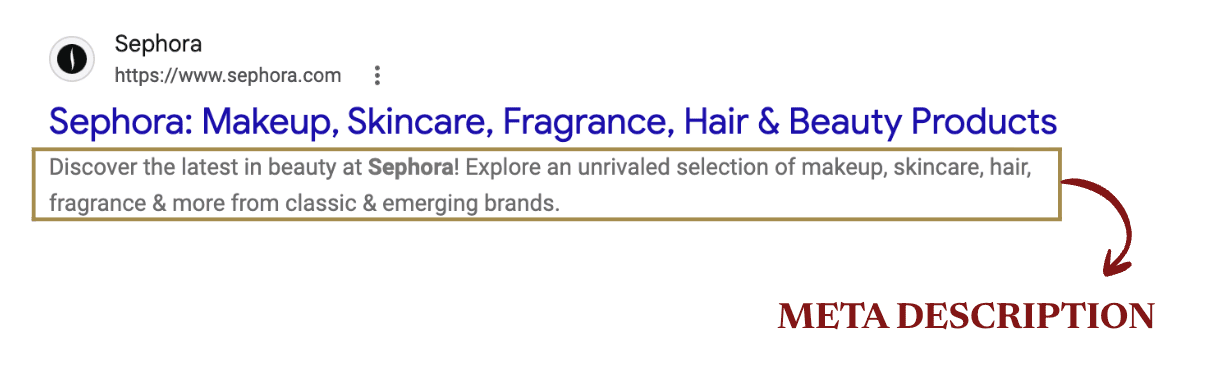
This bit of copy is what Google browsers will use to decide whether your page is worth clicking… or not.
If your page has SEO-optimized copy but it’s *not* getting clicked, odds are, the meta description needs to be updated so it’s more compelling for your target audience.
→ A title tag is simply the clickable title of the page that appears in search results.
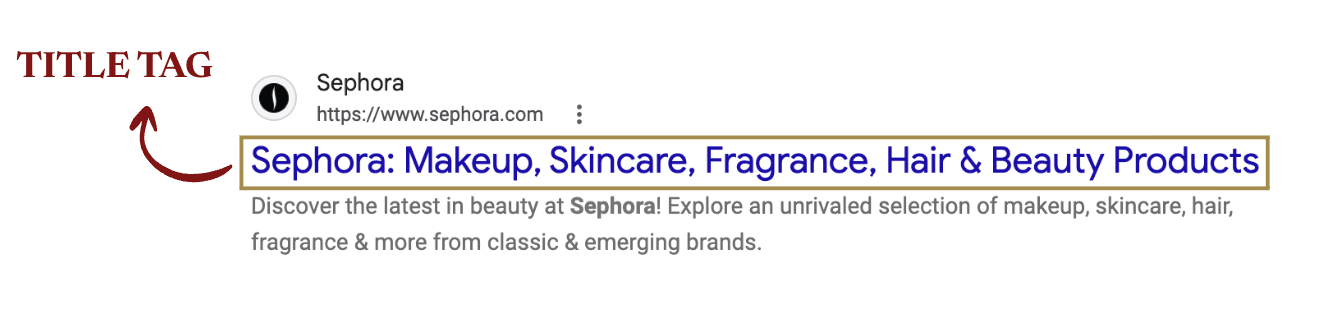
Think of the meta description as a hot fudge sundae and the title tag as the cherry that goes on top.
They’re an inseparable pairing.
Now that you’ve got the basics nailed down, let’s move into the most important part: how to optimize them so you get a major SEO boost.
How to write a good meta description
Use these 2 meta description tips to craft a scroll-stopping description that actually gets clicked:
- Write your copy from scratch
- Weave in your target keyword for the page
Don’t use any clickbait.
Don’t use auto-generated text or a verbatim snippet from the page.
Don’t use bland, yawn-worthy writing that sounds like a robot wrote it.
Simply—and truthfully—describe what the reader will find on your page. But make it compelling.
And if you’re like “how tf do I do that?”, use the following question as your North Star: “Does this make ME want to click?”
If the answer is “no,” rewrite it ‘til the answer is “yes.”
(That’s literally what I do for every meta description I write.)
Example of meta description that makes you wanna click—courtesy of Olive and June:
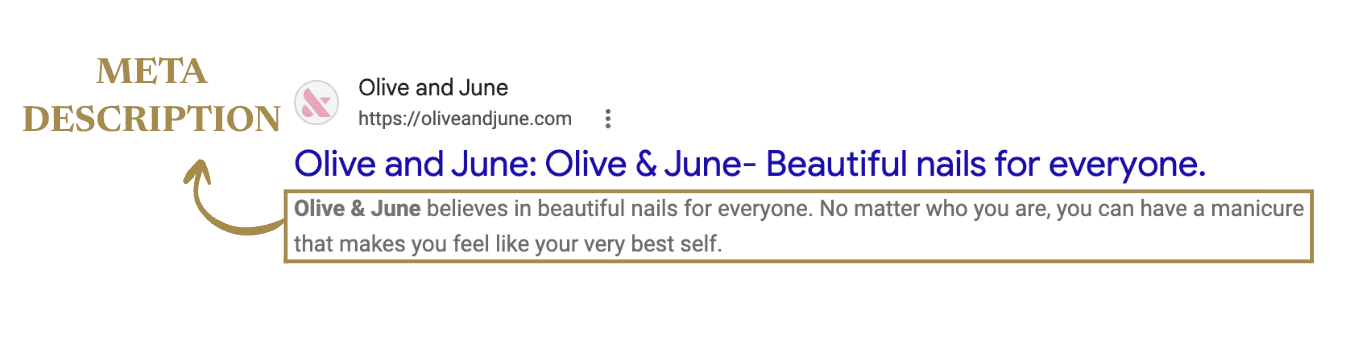
(Side note: Their target keyword is Olive & June. Which makes sense ‘cause they’re a big company and obviously are known for and wanna rank for their own brand name. But small businesses like you and I run generally need to target a more descriptive keyword, like web designer for online entrepreneurs or online accountant for bloggers.)
How long should a meta description be?
160 characters MAX. The Goldilocks sweet spot is 150-160 characters.
If you activate Chatty Kathy mode and go over, your poor meta description will get cut off. Then no one is going to know what you’re saying bc they won’t care enough to find out. (Rude. I know.)
BUT! This character limit is set for desktop reading.
To make sure your meta description doesn’t get butchered on mobile (super important bc more than more than 60% of searches happen on mobile), pack the most important info into the first 105-120 characters.
→ Important caveat, part I
Google search results care more about pixels than a specific character count. For example, big letters like “W” take up more space than “i.” But these character limits are a good general rule of thumb to follow if you don’t wanna totally wing something you should not, in fact, wing.
→ Important caveat, part II (feat. Bad News Bears)
Google might be a lil’ bitch and rewrite your meta description against your will. (It happens in ~70% of cases.)
“Wtf, Jordyn. So none of this actually matters then?” you’re probably thinking rn. Nah, friend. You know I wouldn’t lead you astray. It still matters a LOT.
Customize your meta description anyway.
Because other big-time search engines like Bing and DuckDuckGo—and even the AI overview—DO rely on what you scribble into the meta description box on your site.
How to write a good title tag
For web pages, follow this simple formula:
Target Keyword | Your Business Name
(Or vice versa.)
Or if you’re selling an evergreen course, follow this formula:
Course Name | Target Keyword
(Or vice versa.)
Example of a good title tag for a core web page—courtesy of my homepage lol.
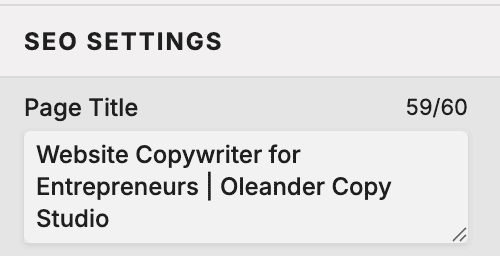
For blog posts, this is simply the title/h1 of your blog post (which should naturally include your target keyword already).
Example of good title tag for a blog post—courtesy of Headspace:
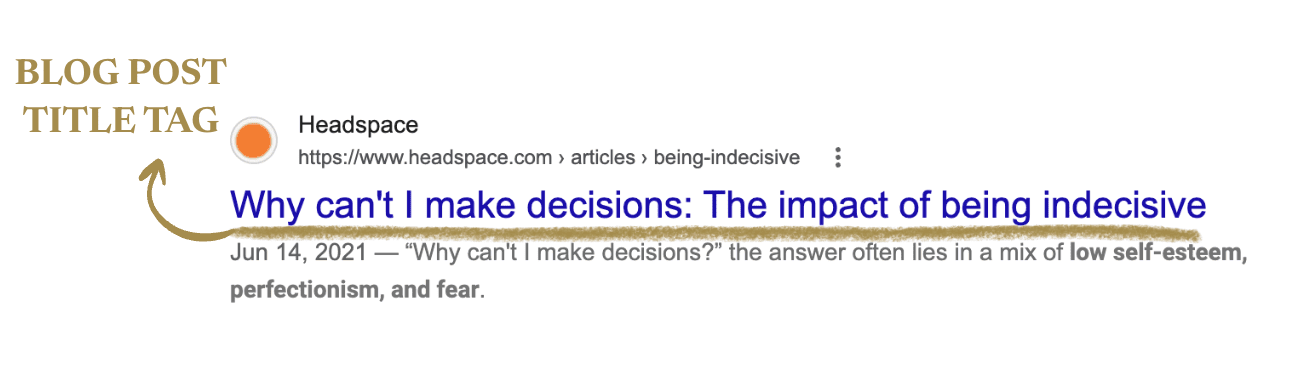
Can we take a quick sec to admire their brilliant keyword choice?
People who struggle with indecision aren’t typing into Google “Why am I indecisive?” They’re typing “Why can’t I make decisions?” (This is why it’s so important to know your target audience inside and out!)
Okay, back to our regular scheduled programming…
→ Important caveat
Not all web pages have a target keyword to include. (E.g., your Blog archive page and Contact page almost certainly won’t.) So SEO isn’t at play.
In those web-page cases, you can create a relevant action-oriented title tag with this formula:
Relevant Action | Business Name
For example, the title tag for my Contact page is “Start Your Project | Oleander Copy Studio”
How long should a title tag be?
Your title tag should be between 50-60 characters.
(Showit will not let you enter more than 60 characters for this reason.)
Where is the title of a website page (and its meta description) located in Showit?
Now that you’ve got all this hand-dandy info, it’s time to actually ADD your page title and meta description to Showit.
Follow these 2 steps to do that once you log into your Showit Editor:
→ Step 1) On the left sidebar, click the page you want to add a title tag to
→ Step 2) On the right sidebar, find and click “SEO Settings”
Wahla! That opens up your page title and meta description boxes. Just make sure you hit “Publish” when you’re done so it updates.
How do I add a meta description to my WordPress blog?
I KNOW YOU’RE WONDERING THIS BC I HAD TO GOOGLE IT, TOO, WHEN I SET UP MY BLOG.
First, you’ve gotta install the Yoast SEO plugin. Here’s how you do that:
→ Step 1) Log into your WordPress admin account.
→ Step 2) Click “Plugins” on the left sidebar.
→ Step 3) Scroll down to “Yoast SEO” and click “Activate”
→ Step 4) Go to the blog post you wanna add meta description to
→ Step 5) Click “Meta Boxes,” which is now on the bottom of every blog post (you’re welcome)
→ Step 6) Insert your target keyword in the “Focus keyphrase” section so Yoast doesn’t give you a red dot that sets off an existential crisis gives you the happy GREEN dot that makes you feel like an SEO pro. Then type in your shiny new meta description! (Also make sure to put in your title/h1 into the “Slug” section. Or you can simply enter your target keyword if you’d rather do that.)
Pro tip: The great thing about Yoast is you can preview how your blog meta description looks on mobile and desktop so you know if any pertinent info is being cut off or not.
And *that’s* how to write a meta description and title tag in 5 mins
I hope you found these title tag and meta description tips helpful!
Before you go, I’ve got a goodie bag ready for you—on the house.
Wanna uncover the top 3 reasons causing dream clients to bounce from your homepage—and see how to fix them?